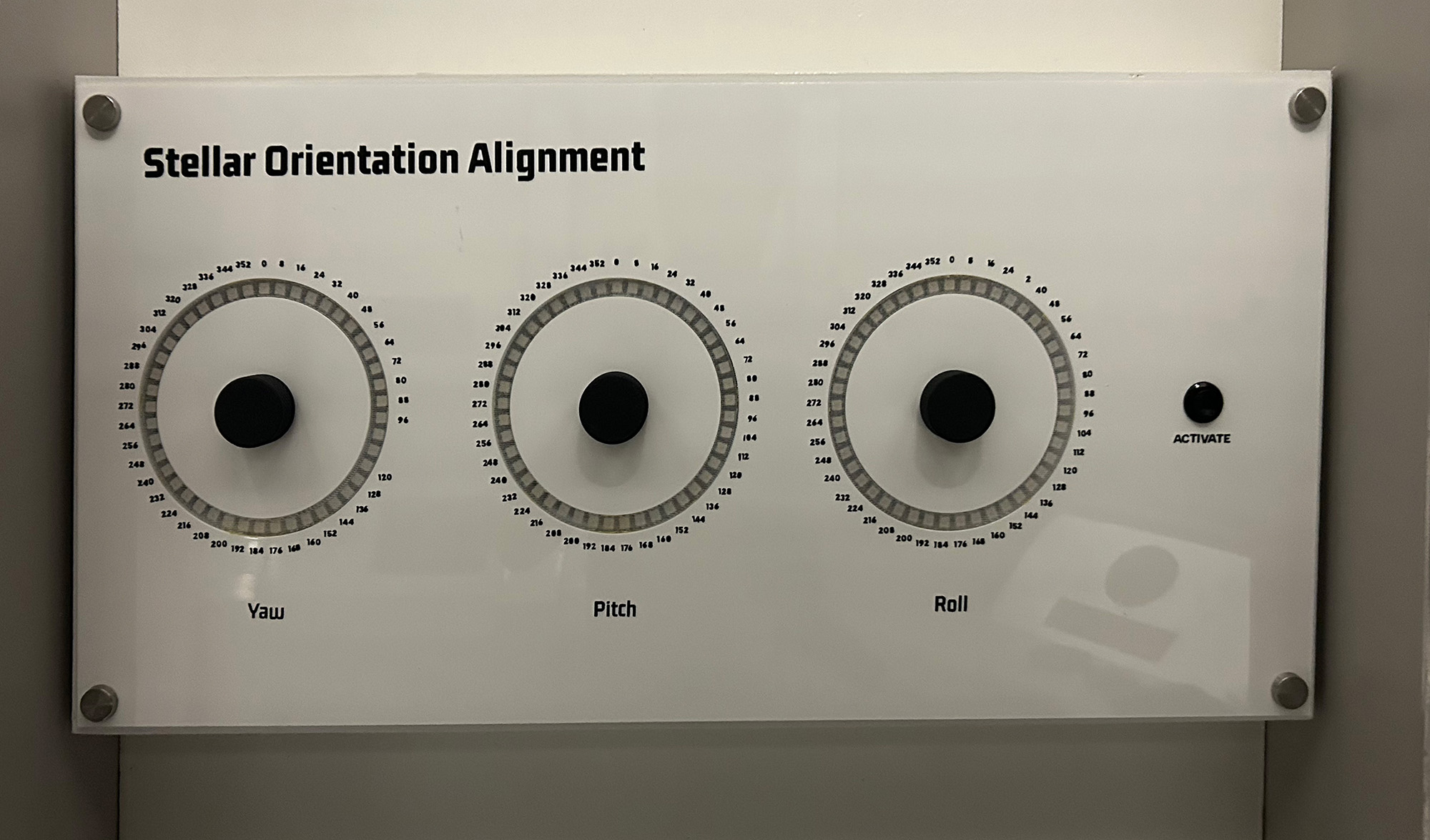
Stellar Orientation Alignment
In this tutorial you will build a spacecraft orientation control system using three rotary encoders to simulate yaw, pitch, and roll adjustments. Players must align all three axes to specific coordinates using visual feedback from three concentric LED rings. This puzzle features real-time WebSocket communication for seamless integration with escape room control systems and creates an immersive navigation experience.
Gameplay Mechanics
The Challenge
Players must discover the correct orientation coordinates through clues in the escape room. These might be hidden in star charts, navigation logs, or encoded messages.
With 45 positions per axis, there are 91,125 possible combinations (45³), making random guessing impractical and requiring players to solve the clues.
The visual representation helps players understand spacecraft orientation concepts while providing an intuitive control interface.
How Players Interact
- Observe the rings: Each ring represents one axis of spacecraft orientation
- Turn encoders: Rotate to adjust yaw (vertical), pitch (lateral), or roll (longitudinal) axes
- Watch LED feedback: Bright LED shows current position on each colored ring
- Press to validate: Hit the activation button to check if coordinates are correct
- Interpret results: Green flash = success, red flash = incorrect alignment
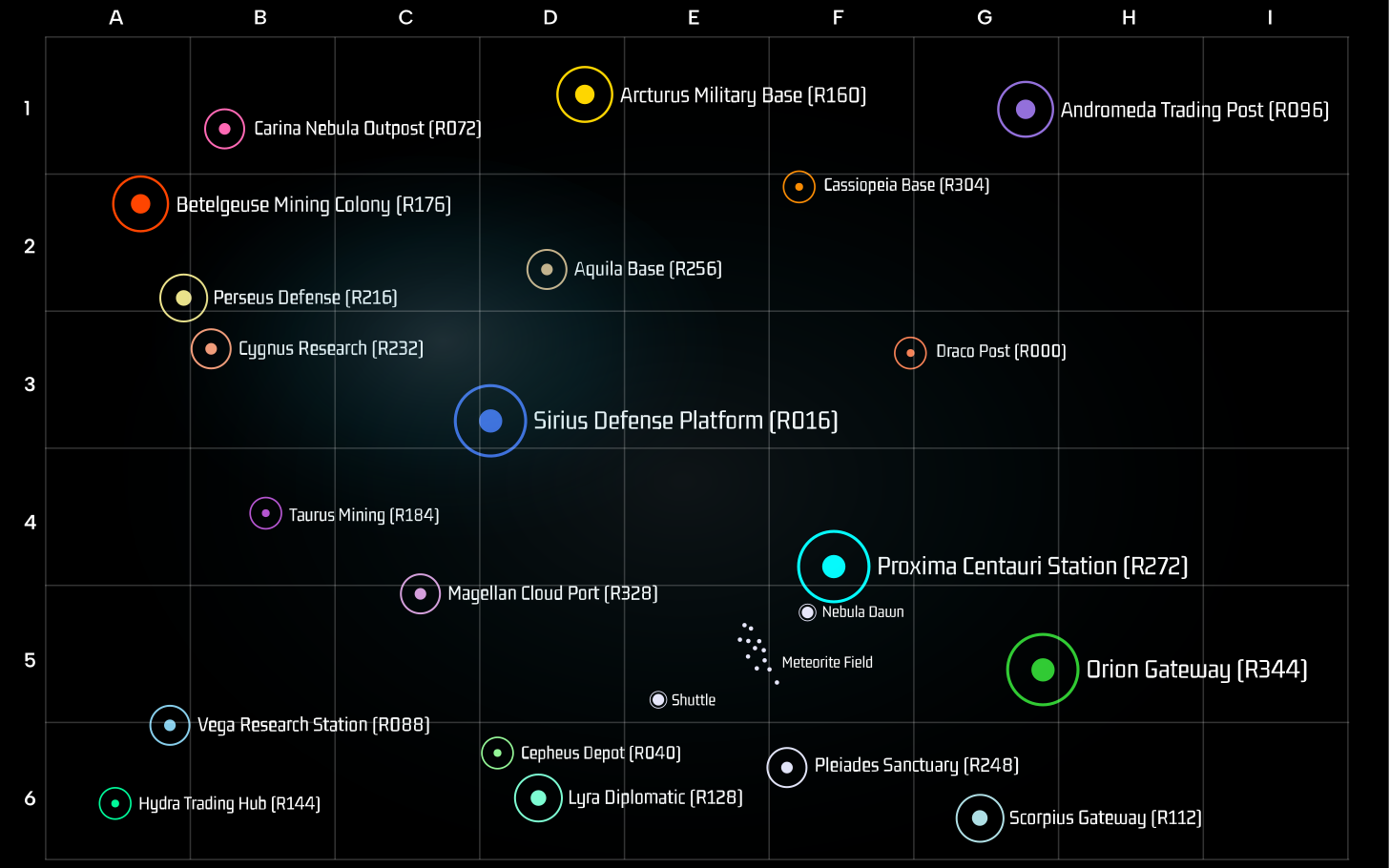
Star Chart Showing the Possible Locations
Required Components
Hardware
- 1x ESP32 Development Board
- 3x Rotary Encoders (for Yaw, Pitch, Roll)
- 135x WS2812B LEDs (3 rings of 45 LEDs each)
- 1x Push button (activation button)
- 5V Power Supply (4A minimum)
- Jumper wires
- 1000µF capacitor (for LED power)
- 470Ω resistor (between GPIO pin and LED Ring)
Software Requirements
- Arduino IDE (1.8.0 or later)
- ESP32 Board Package
- FastLED Library (3.5.0+)
- WebSocketsClient Library
- ArduinoJson Library (6.x)
- Node-RED server (optional)
Wiring Diagram
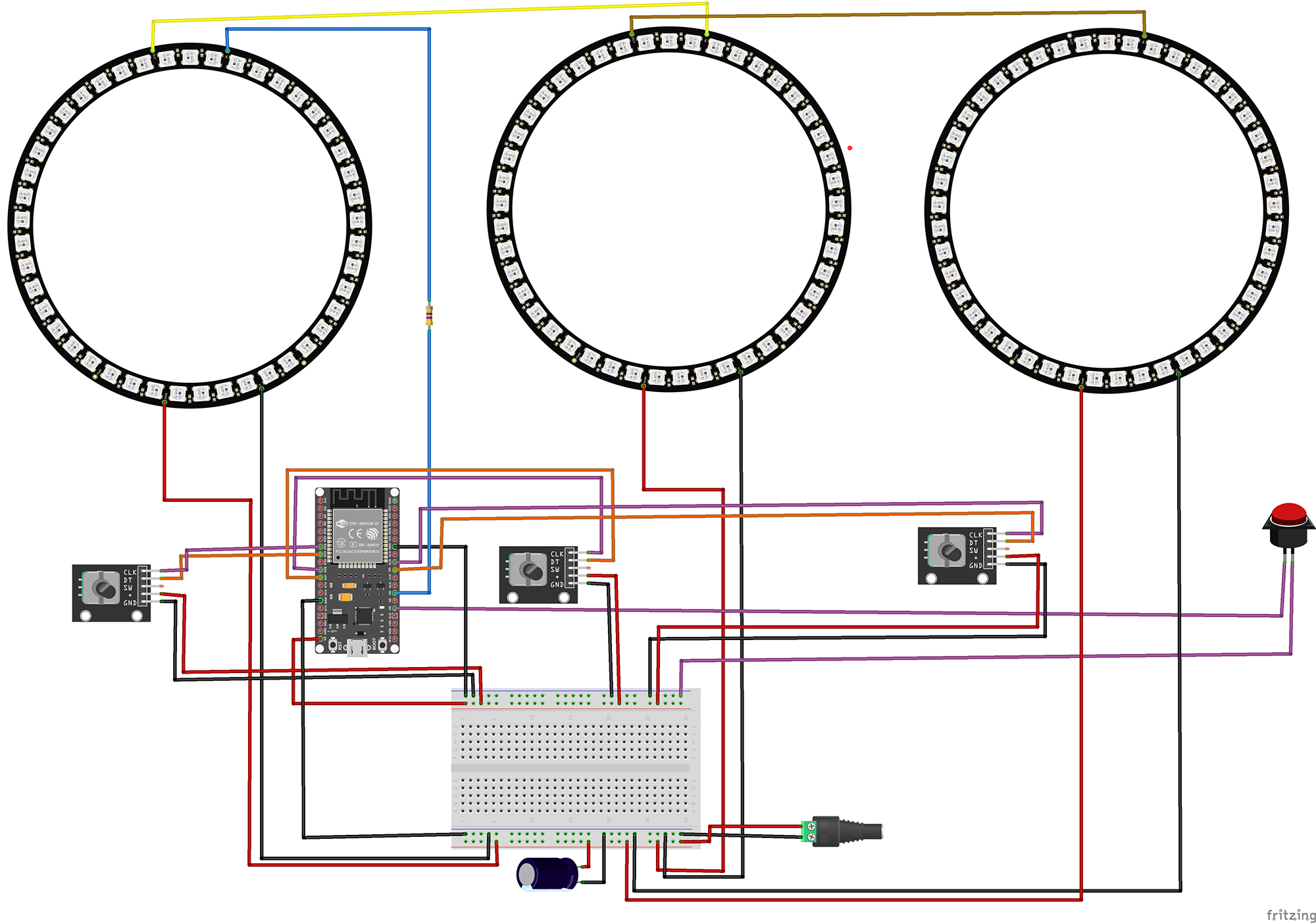
Yaw Encoder
- CLK → GPIO 33
- DT → GPIO 32
- + → 5V
- GND → GND
Pitch Encoder
- CLK → GPIO 27
- DT → GPIO 26
- + → 5V
- GND → GND
Roll Encoder
- CLK → GPIO 18
- DT → GPIO 5
- + → 5V
- GND → GND
LED Rings
- Data → GPIO 4
- VCC → 5V
- GND → GND
- 45 LEDs per ring
- Rings wired in series
Activation Button
- Terminal 1 → GPIO 2
- Terminal 2 → GND
- Internal pull-up enabled
Power Management
- External 5V supply required
- 1000µF cap across power
- 470Ω on data line
- Common ground with ESP32
The Code
1Include Required Libraries
Import all necessary libraries for LED control, WiFi connectivity, and JSON communication:
// Core Arduino library
#include <Arduino.h>

// LED control library
#include <FastLED.h>

// Network libraries
#include <WiFi.h>
#include <WebSocketsClient.h>
#include <ArduinoJson.h>
What each library does:
FastLED.h: High-performance library for controlling WS2812B LEDs. Provides smooth color manipulation and efficient data transmission for our three orientation rings.
WiFi.h: ESP32's built-in WiFi library for network connectivity. Essential for connecting to the escape room's control network.
WebSocketsClient.h: Enables real-time bidirectional communication with the escape room server. Perfect for instant status updates and remote control.
ArduinoJson.h: Efficient JSON parsing and generation. Used to format orientation data and status messages in a standard format.
2Pin Definitions and Configuration
Define all hardware connections and network settings:
// Pin Definitions
#define YAW_PIN_A 33
#define YAW_PIN_B 32
#define PITCH_PIN_A 27
#define PITCH_PIN_B 26
#define ROLL_PIN_A 18
#define ROLL_PIN_B 5
#define LED_PIN 4
#define ACTIVATE_BUTTON 2

// Network Configuration
const char* ssid = "Network SSID";
const char* password = "Network Password";
const char* wsHost = "172.16.12.2";
const int wsPort = 1880;
const char* wsPath = "/events";

// Static IP Configuration
IPAddress local_IP(172, 16, 12, 11);
IPAddress gateway(172, 16, 12, 1);
IPAddress subnet(255, 255, 255, 0);

// Puzzle identification
const char* PUZZLE_ID = "SOA";
Configuration explained:
Encoder pins: Each encoder uses two GPIO pins for quadrature encoding. The pins are chosen to avoid conflicts with WiFi and other ESP32 functions.
Static IP: Ensures the puzzle always has the same network address, crucial for reliable server communication.
PUZZLE_ID: "SOA" stands for "Stellar Orientation Alignment" - unique identifier in the escape room system.
3LED Ring Configuration
Set up the visual representation for each orientation axis:
// LED Configuration
#define LEDS_PER_RING 45
#define TOTAL_LEDS (LEDS_PER_RING * 3)
#define STEPS_PER_DETENT 4
#define INCREMENT_VALUE 8

// Colors for each axis
const CRGB YAW_COLOR = CRGB(0, 255, 255);    // Cyan
const CRGB PITCH_COLOR = CRGB(128, 0, 128);  // Purple
const CRGB ROLL_COLOR = CRGB(255, 255, 0);   // Yellow

// Solution coordinates (Yaw-Pitch-Roll)
const int SOLUTION[3] = {136, 48, 272};

// State Variables
CRGB leds[TOTAL_LEDS];
int ringValues[3] = {0, 0, 0};  // Yaw, Pitch, Roll
bool solved = false;
LED organization:
Ring assignment: Ring 1 (LEDs 0-44) = Roll, Ring 2 (LEDs 45-89) = Pitch, Ring 3 (LEDs 90-134) = Yaw
Color coding: Each axis has a distinct color matching spacecraft orientation conventions. Cyan for yaw (vertical axis), purple for pitch (lateral axis), yellow for roll (longitudinal axis).
Increments: Each encoder click moves 8 degrees, providing 45 positions per full rotation (360°/8° = 45 positions matching LED count).
Solution: The target orientation in degrees. Players must discover these coordinates through clues in the escape room.
4Interrupt-Driven Encoder Reading
Implement responsive encoder handling using hardware interrupts:
// Generic encoder update function
void IRAM_ATTR updateEncoder(int index, int pinA, int pinB) {
    int MSB = digitalRead(pinA);
    int LSB = digitalRead(pinB);
    int encoded = (MSB << 1) | LSB;
    int sum = (lastEncoded[index] << 2) | encoded;

    // Determine rotation direction using state machine
    if (sum == 0b1101 || sum == 0b0100 ||
        sum == 0b0010 || sum == 0b1011) {
        encoderValue[index]++;
    } else if (sum == 0b1110 || sum == 0b0111 ||
               sum == 0b0001 || sum == 0b1000) {
        encoderValue[index]--;
    }

    lastEncoded[index] = encoded;
}

// Individual interrupt handlers for each axis
void IRAM_ATTR updateYaw() {
    updateEncoder(0, YAW_PIN_A, YAW_PIN_B);
}
void IRAM_ATTR updatePitch() {
    updateEncoder(1, PITCH_PIN_A, PITCH_PIN_B);
}
void IRAM_ATTR updateRoll() {
    updateEncoder(2, ROLL_PIN_A, ROLL_PIN_B);
}
Encoder processing explained:
IRAM_ATTR: Places interrupt handler in RAM for faster execution, crucial for responsive control.
Gray code decoding: The bit patterns represent valid state transitions in quadrature encoding, determining clockwise vs counterclockwise rotation.
Index mapping: 0=Yaw, 1=Pitch, 2=Roll - each encoder updates its corresponding axis value.
No debouncing needed: Quadrature encoding inherently provides noise immunity through its state machine approach.
5LED Display and Animation
Create visual feedback showing current orientation and validation results:
Main LED Update Function
void updateLEDs() {
    FastLED.clear();

    // Roll Ring (Ring 1 - Inner)
    for (int i = 0; i < LEDS_PER_RING; i++) {
        leds[i] = ROLL_COLOR;
        leds[i].nscale8(15);  // Dim background
    }
    leds[ringValues[2] / 8] = ROLL_COLOR;  // Bright position marker

    // Pitch Ring (Ring 2 - Middle)
    for (int i = 0; i < LEDS_PER_RING; i++) {
        leds[i + LEDS_PER_RING] = PITCH_COLOR;
        leds[i + LEDS_PER_RING].nscale8(15);
    }
    leds[ringValues[1] / 8 + LEDS_PER_RING] = PITCH_COLOR;

    // Yaw Ring (Ring 3 - Outer)
    for (int i = 0; i < LEDS_PER_RING; i++) {
        leds[i + (LEDS_PER_RING * 2)] = YAW_COLOR;
        leds[i + (LEDS_PER_RING * 2)].nscale8(15);
    }
    leds[ringValues[0] / 8 + (LEDS_PER_RING * 2)] = YAW_COLOR;

    FastLED.show();
}
Display logic:
Each ring shows a dim colored background with one bright LED indicating current position.
Position calculation: degrees / 8 = LED index (0-44).
nscale8(15) reduces brightness to ~6% for background ambiance.
The three rings create a visual representation of the spacecraft's orientation in 3D space.
Success Animation
void playSuccessAnimation() {
    for (int flash = 0; flash < 3; flash++) {
        // Set all LEDs to green
        for (int i = 0; i < TOTAL_LEDS; i++) {
            leds[i] = CRGB::Green;
        }
        FastLED.show();
        delay(200);

        FastLED.clear();
        FastLED.show();
        delay(200);
    }
    updateLEDs(); // Return to normal display
}
Failure Animation
void playFailureAnimation() {
    for (int flash = 0; flash < 3; flash++) {
        // Set all LEDs to red
        for (int i = 0; i < TOTAL_LEDS; i++) {
            leds[i] = CRGB::Red;
        }
        FastLED.show();
        delay(200);

        FastLED.clear();
        FastLED.show();
        delay(200);
    }
    updateLEDs(); // Return to normal display
}
Feedback patterns:
Green triple flash confirms successful alignment - coordinates locked!
Red triple flash indicates incorrect alignment - try again.
1.2 second total animation provides clear feedback without disrupting gameplay flow.
6WebSocket Communication
Implement real-time communication with the escape room server:
void sendInitializationMessage() {
    if (!connected) return;

    StaticJsonDocument<256> doc;
    doc["shortName"] = PUZZLE_ID;
    doc["type"] = "INITIATION";

    // Create nested object for orientation values
    JsonObject orientation = doc.createNestedObject("orientation");
    orientation["yaw"] = ringValues[0];
    orientation["pitch"] = ringValues[1];
    orientation["roll"] = ringValues[2];

    doc["solved"] = solved;

    String jsonString;
    serializeJson(doc, jsonString);
    webSocket.sendTXT(jsonString);
}

void sendOrientationUpdateMessage() {
    if (!connected) return;

    StaticJsonDocument<256> doc;
    doc["shortName"] = PUZZLE_ID;
    doc["type"] = "UPDATE";
    doc["yaw"] = ringValues[0];
    doc["pitch"] = ringValues[1];
    doc["roll"] = ringValues[2];

    String jsonString;
    serializeJson(doc, jsonString);
    webSocket.sendTXT(jsonString);
}
Message types:
INITIATION: Sent on connection to register puzzle and report initial state.
UPDATE: Sent whenever any encoder changes position, allows real-time monitoring.
SOLVE: Sent when puzzle is solved or becomes unsolved, triggers next puzzle in sequence.
All messages include current orientation values for complete state tracking.
7Solution Checking
Validate the current orientation against the target coordinates:
bool checkSolution() {
    previouslySolved = solved;
    bool foundSolution = false;

    // Check against the solution: Y136 P48 R272
    if (ringValues[0] == SOLUTION[0] &&
        ringValues[2] == SOLUTION[2]) {
        foundSolution = true;
    }

    if (foundSolution) {
        // Play animation and update state if needed
        playSuccessAnimation();
        if (!solved) {
            solved = true;
            sendSolvedMessage(true);
        }
        return true;
    } else {
        // Play animation and update state if needed
        playFailureAnimation();
        if (solved) {
            solved = false;
            sendSolvedMessage(false);
        }
        return false;
    }
}
Solution validation:
Exact match required: All three axes must be precisely aligned to the target coordinates.
State tracking: Only sends network messages when puzzle state changes (solved→unsolved or vice versa).
Visual feedback: Always plays animation on button press for immediate player feedback.
Auto-detection: If values change after solving, automatically marks as unsolved if coordinates no longer match.
Testing Your Stellar Orientation System
1Initial Hardware Verification
Upload this test sketch to verify all components:
void setup() {
    Serial.begin(115200);

    // Test encoders
    pinMode(YAW_PIN_A, INPUT_PULLUP);
    pinMode(YAW_PIN_B, INPUT_PULLUP);
    pinMode(PITCH_PIN_A, INPUT_PULLUP);
    pinMode(PITCH_PIN_B, INPUT_PULLUP);
    pinMode(ROLL_PIN_A, INPUT_PULLUP);
    pinMode(ROLL_PIN_B, INPUT_PULLUP);

    // Test LED rings - light each ring in sequence
    FastLED.addLeds<WS2812B, LED_PIN, GRB>(leds, TOTAL_LEDS);
    FastLED.setBrightness(50);

    // Light Roll ring (yellow)
    for(int i = 0; i < 45; i++) {
        leds[i] = CRGB::Yellow;
    }
    FastLED.show();
    delay(1000);

    // Add Pitch ring (purple)
    for(int i = 45; i < 90; i++) {
        leds[i] = CRGB::Purple;
    }
    FastLED.show();
    delay(1000);

    // Add Yaw ring (cyan)
    for(int i = 90; i < 135; i++) {
        leds[i] = CRGB::Cyan;
    }
    FastLED.show();
}2Troubleshooting Common Issues
Encoder Problems
- Verify pull-up resistors are enabled
- Check encoder common pin is grounded
- Test with Serial output in interrupt handlers
- Try swapping A/B pins if rotation reversed
- Ensure encoder quality (optical > mechanical)
LED Ring Issues
- Check 5V power supply amperage
- Verify data line has 470Ω resistor
- Test with lower brightness (25-50)
- Ensure capacitor across power lines
- Check LED count matches code (45 per ring)
Network Connection
- Verify WiFi credentials match network
- Check static IP isn't already in use
- Confirm WebSocket server is running
- Monitor Serial for connection status
- Test with simple ping to server IP
Solution Not Triggering
- Press button to view current values
- Verify solution values are correct
- Check increment is 8 degrees per click
- Ensure button has pull-up enabled
- Monitor Serial for debug output
3Serial Monitor Debug Output
Press the activation button to see current orientation values:
Current Values:
Yaw: 136
Pitch: 48
Roll: 272
Target: Yaw=136, Pitch=48, Roll=272
---------------

WebSocket connected to: /events
Sent initialization message: {"shortName":"SOA","type":"INITIATION","orientation":{"yaw":136,"pitch":48,"roll":272},"solved":true}
Sent solved status: {"shortName":"SOA","type":"SOLVE","solved":true}
The serial output provides real-time feedback for debugging and monitoring the puzzle state during gameplay.
Possible Enhancements
Multiple Solutions
Add an array of valid coordinates that change based on game progress or time, creating dynamic challenges throughout the escape room experience.
Drift Simulation
Implement gradual value drift over time, requiring players to make corrections periodically, simulating real spacecraft stabilization challenges.
Sound Effects
Add a DFPlayer Mini for spacecraft ambiance, thruster sounds during adjustment, and alert tones for successful alignment.
Motion Feedback
Connect servo motors to physical gimbal rings that move to match the digital orientation, creating a tangible representation.
Proximity Hints
Make rings pulse faster or change color intensity as players approach correct values, providing subtle guidance without giving away the solution.
Team Mode
Split control across multiple stations where different players control different axes, requiring coordination and communication.
Get in touch!
We are currently looking for educators and students to collaborate with on future projects.
Get in Touch!
hello@escapehumber.ca