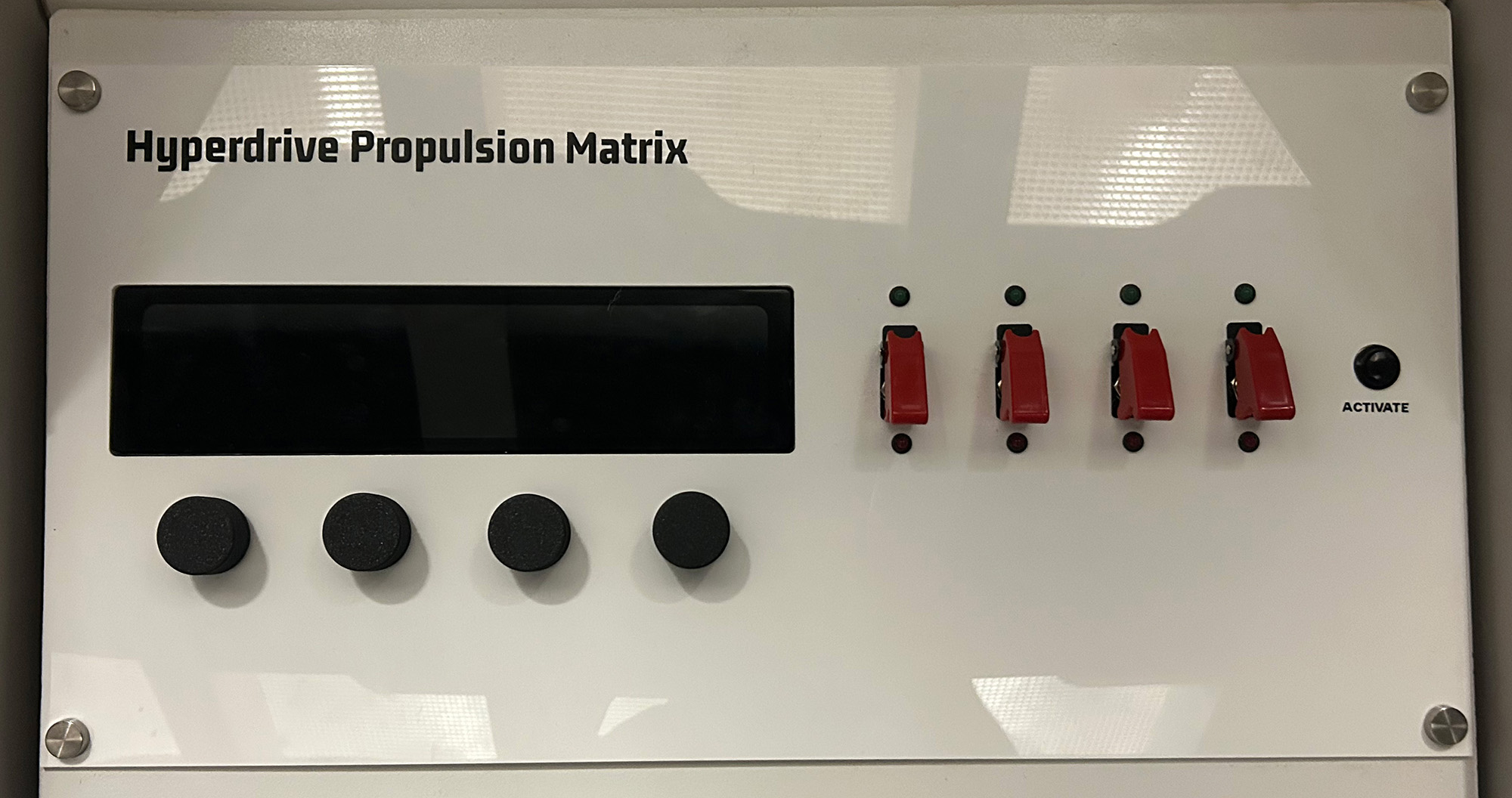
Hyperdrive Propulsion Matrix
This tutorial builds a spacecraft fuel mixture control system using four rotary encoders connected to a Raspberry Pi. Players must adjust the precise mixture of Oxidizer, Fuel, and PBAN (Polybutadiene Acrylonitrile) along with selecting the correct mixture type to achieve the perfect propulsion formula. This puzzle features real-time WebSocket communication, persistent encoder values across reconnections, and status feedback for an immersive engineering challenge.
Gameplay Mechanics
The Challenge
Players must correctly mix the shuttle's fuel to solve this puzzle. The correct mixture (55% Oxidizer, 25% Fuel, 10% PBAN, Type 3) represent a specific propellant formulation found in the Captain's log.
With 101 values for each percentage encoder and 5 mixture types, there are over 5 million possible combinations (101³ × 5), making brute force impossible.
The persistent values mean players can work together, with different team members adjusting different components without losing progress.
How Players Interact
- Observe current values: Display shows current mixture percentages and type
- Flip security override switch: The safe cap is lifted and switch is flipped to ON to enable power to a rotary encoder
- Adjust oxidizer: Rotate first encoder to set oxidizer percentage (0-100%)
- Adjust fuel: Rotate second encoder to set fuel percentage (0-100%)
- Adjust PBAN: Rotate third encoder to set binder percentage (0-100%)
- Select mixture type: Rotate fourth encoder to choose formula type (0-4)
- Activate check: Press button to verify the mixture
- Wait for analysis: 3.5-second checking period builds tension
- Read result: Display shows CORRECT or INCORRECT status
Required Components
Hardware
- 1x Raspberry Pi (3B+ or newer)
- 4x Rotary Encoders (with detents)
- 4x SPDT Switches with Safety Caps
- 1x Push button (activation button)
- Jumper wires
- Breadboard
- 220Ω resistors
- 4x Green LEDs
- 4x Red LEDs
- 3.3V/5V Power Supply
Software Requirements
- Raspberry Pi OS
- Python 3.7+
- RPi.GPIO library
- asyncio library
- websockets library
- Node-RED server
Wiring Diagram
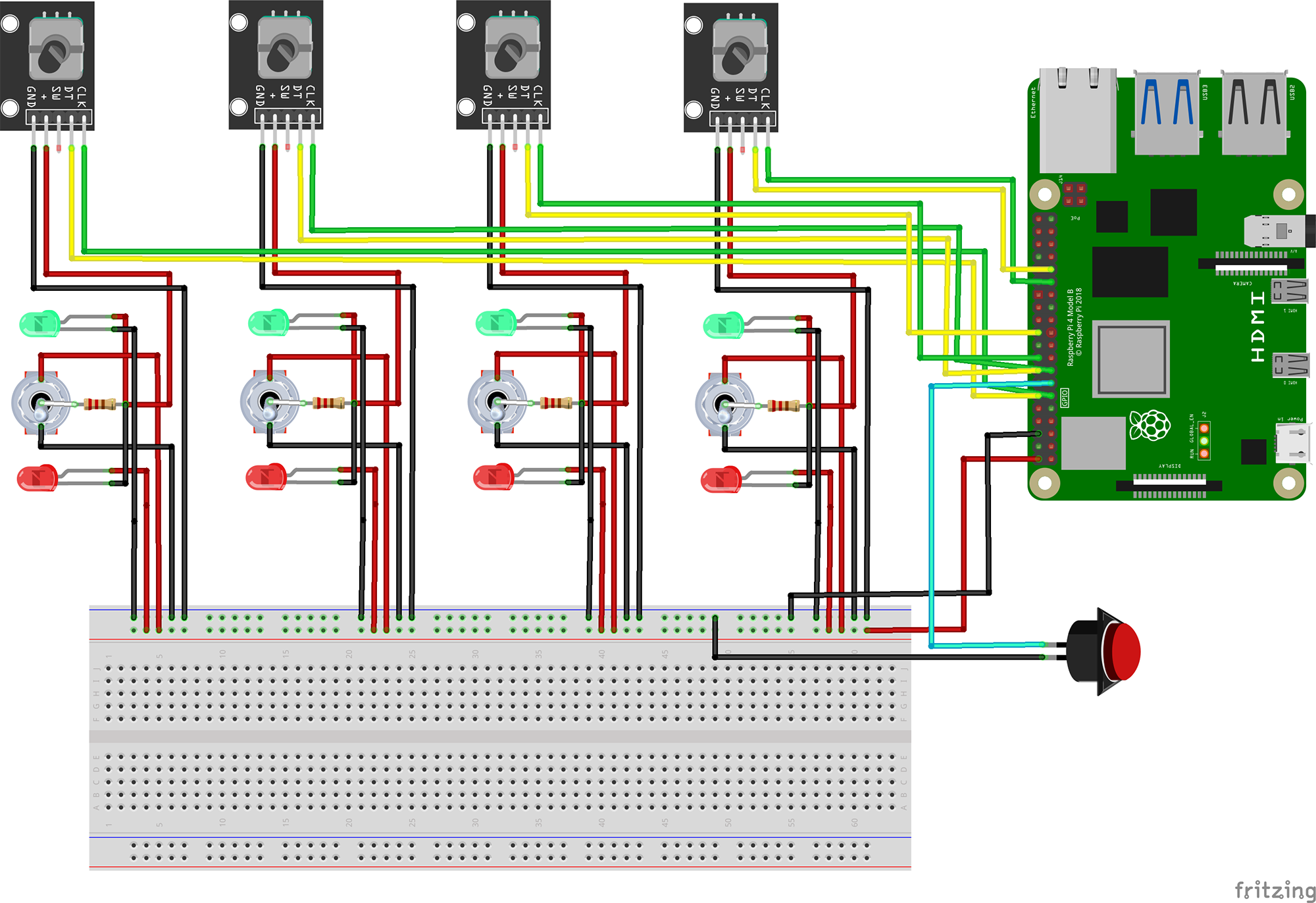
Oxidizer Encoder
- CLK → GPIO 17
- DT → GPIO 18
- SW → Not used
- + → Common Terminal of SPDT Switch
- GND → GND
Fuel Encoder
- CLK → GPIO 22
- DT → GPIO 23
- SW → Not used
- + → Common Terminal of SPDT Switch
- GND → GND
PBAN Encoder
- CLK → GPIO 24
- DT → GPIO 25
- SW → Not used
- + → Common Terminal of SPDT Switch
- GND → GND
Mixture Type Selector
- CLK → GPIO 5
- DT → GPIO 6
- SW → Not used
- + → Common Terminal of SPDT Switch
- GND → GND
Activation Button
- Terminal 1 → GPIO 27
- Terminal 2 → GND
- Internal pull-up enabled
WebSocket Connection
- Server: localhost:1880
- Path: /encoder
- Reconnects automatically
The Code
1Import Required Libraries
Import all necessary Python libraries for GPIO control, asynchronous operations, and WebSocket communication:
# GPIO control library
from RPi import GPIO

# Asynchronous programming support
import asyncio
import websockets

# Data serialization and utilities
import json
from datetime import datetime
What each library does:
RPi.GPIO: Provides low-level access to Raspberry Pi GPIO pins. Handles pin configuration, reading digital inputs, and managing pull-up/pull-down resistors.
asyncio: Python's asynchronous I/O framework. Enables concurrent operations without threading, perfect for handling multiple encoder inputs and WebSocket communication simultaneously.
websockets: Implements WebSocket client functionality for real-time bidirectional communication with the Node-RED server.
json: Handles conversion between Python dictionaries and JSON strings for message formatting.
2Global Configuration and Storage
Define persistent storage for encoder values and the solution:
# Store encoder values globally to persist across reconnections
ENCODER_VALUES = {
    1: 70,  # Oxidizer (0-100%)
    2: 50,  # Fuel (0-100%)
    3: 40,  # PBAN (0-100%)
    4: 0    # Mixture Type selector (0-4)
}

# Define the solution values
SOLUTION = {
    1: 55,  # Oxidizer target
    2: 25,  # Fuel target
    3: 10,  # PBAN target
    4: 3    # Mixture type target
}

BUTTON_PIN = 27  # GPIO pin for the activation button
CHECKING_TIME = 3.5  # Seconds to simulate checking process
Configuration explained:
Persistent values: ENCODER_VALUES maintains state across WebSocket reconnections, ensuring players don't lose progress if the connection drops.
Solution formula: The correct mixture is 55% Oxidizer, 25% Fuel, 10% PBAN with Mixture Type 3. This could represent a specific rocket fuel formulation.
Checking delay: The 3.5-second delay simulates a realistic analysis process, building tension during gameplay.
3Encoder Configuration
Set up the encoder pin mappings and status messages:
ENCODERS = [
    {'clk': 17, 'dt': 18, 'id': 1},  # Oxidizer
    {'clk': 22, 'dt': 23, 'id': 2},  # Fuel
    {'clk': 24, 'dt': 25, 'id': 3},  # PBAN
    {'clk': 5, 'dt': 6, 'id': 4}     # Mixture Type selector
]

WS_URI = "ws://localhost:1880/encoder"

# Status message constants
STATUS_MESSAGES = {
    'checking': {
        'status': 'CHECKING MIXTURE',
        'suffix': '. PLEASE WAIT'
    },
    'correct': {
        'status': 'CORRECT MIXTURE',
        'suffix': '. DO NOT TOUCH'
    },
    'incorrect': {
        'status': 'INCORRECTLY MIXED',
        'suffix': '. PLEASE REMIX AND REACTIVATE'
    }
}
Encoder mapping:
CLK and DT pins: Each rotary encoder uses two pins for quadrature encoding, allowing detection of both rotation direction and speed.
ID assignment: Each encoder has a unique ID (1-4) that corresponds to its function in the mixture control system.
Status messages: Pre-defined messages provide clear feedback to players through the escape room's display system.
4EncoderReader Class
Implement the main class that handles encoder reading and WebSocket communication:
class EncoderReader:
    def __init__(self, encoders):
        GPIO.setmode(GPIO.BCM)
        self.encoders = []
        self.checking = False

        # Setup button with pull-up resistor
        GPIO.setup(BUTTON_PIN, GPIO.IN, pull_up_down=GPIO.PUD_UP)

        # Initialize each encoder
        for enc in encoders:
            GPIO.setup(enc['clk'], GPIO.IN, pull_up_down=GPIO.PUD_UP)
            GPIO.setup(enc['dt'], GPIO.IN, pull_up_down=GPIO.PUD_UP)
            self.encoders.append({
                'clk': enc['clk'],
                'dt': enc['dt'],
                'id': enc['id'],
                'value': ENCODER_VALUES[enc['id']],
                'clk_last_state': GPIO.input(enc['clk'])
            })

    async def send_keepalive(self, websocket):
        try:
            await websocket.send(json.dumps({"type": "keepalive"}))
            print(f"{datetime.now()}: Keepalive sent")
        except Exception as e:
            print(f"Keepalive error: {e}")
            raise
Class initialization:
GPIO.BCM mode: Uses Broadcom pin numbering (GPIO numbers) rather than physical pin numbers for consistency.
Pull-up resistors: Internal pull-ups ensure stable HIGH state when encoders are not being rotated.
State tracking: Stores the last CLK state for each encoder to detect state transitions.
Keepalive messages: Prevents WebSocket timeout by sending periodic heartbeat messages.
5Solution Checking Logic
Implement the mixture validation and status reporting:
Check Solution Method
async def check_solution(self, websocket):
    if self.checking:
        return

    self.checking = True
    await self.send_status(websocket, 'checking')

    # Artificial delay to simulate checking process
    await asyncio.sleep(CHECKING_TIME)

    # Check if all encoders match solution
    correct = all(
        ENCODER_VALUES[enc_id] == SOLUTION[enc_id]
        for enc_id in SOLUTION.keys()
    )

    # Send result
    status_type = 'correct' if correct else 'incorrect'
    await self.send_status(websocket, status_type)
    print(f"{datetime.now()}: Current values: {ENCODER_VALUES}")
    print(f"{datetime.now()}: Target values: {SOLUTION}")

    self.checking = False
Solution checking process:
Prevents multiple simultaneous checks with the checking flag.
Sends "CHECKING MIXTURE" status to build anticipation.
Uses Python's all() function for elegant validation of all four values.
Provides detailed console output for debugging and monitoring.
Encoder Reading Loop
async def read_and_send(self, websocket):
    last_keepalive = 0
    last_button_state = GPIO.input(BUTTON_PIN)

    # Send initial incorrect status
    await self.send_status(websocket, 'incorrect')

    while True:
        current_time = asyncio.get_event_loop().time()

        # Send keepalive every 2 seconds
        if current_time - last_keepalive >= 2:
            await self.send_keepalive(websocket)
            last_keepalive = current_time

        # Check button state for activation
        button_state = GPIO.input(BUTTON_PIN)
        if button_state != last_button_state and button_state == GPIO.LOW:
            print(f"{datetime.now()}: Button pressed! Starting solution check...")
            await self.check_solution(websocket)
        last_button_state = button_state

        # Read each encoder
        for enc in self.encoders:
            clk_state = GPIO.input(enc['clk'])
            dt_state = GPIO.input(enc['dt'])

            if clk_state != enc['clk_last_state'] and clk_state == 0:
                # Determine rotation direction
                new_value = enc['value'] + (1 if dt_state != clk_state else -1)

                # Apply limits based on encoder type
                if enc['id'] != 4:
                    # Percentage encoders (0-100)
                    enc['value'] = max(0, min(100, new_value))
                else:
                    # Mixture type selector (0-4, wraps around)
                    enc['value'] = new_value % 5

                # Update global store and send to server
                ENCODER_VALUES[enc['id']] = enc['value']

                data = json.dumps({
                    'encoder': enc['id'],
                    'position': enc['value']
                })
                await websocket.send(data)

                # Reset to incorrect status after any change
                await self.send_status(websocket, 'incorrect')

            enc['clk_last_state'] = clk_state

        await asyncio.sleep(0.001)
Reading logic breakdown:
Detects rotation direction by comparing CLK and DT states during transitions.
Different value ranges: 0-100 for mixture components, 0-4 for mixture type (with wraparound).
1ms sleep prevents CPU overload while maintaining responsive control.
Automatically marks mixture as incorrect after any adjustment, requiring revalidation.
6Main Connection Loop
Implement auto-reconnection and error handling:
async def main():
    while True:
        try:
            async with websockets.connect(
                WS_URI,
                ping_interval=1,
                ping_timeout=5,
                close_timeout=1,
                max_size=2**20,
                max_queue=2**10
            ) as websocket:
                print(f"{datetime.now()}: Connected to Node-RED")

                # Send current values immediately after connection
                for enc_id, value in ENCODER_VALUES.items():
                    data = json.dumps({
                        'encoder': enc_id,
                        'position': value
                    })
                    await websocket.send(data)
                    print(f"{datetime.now()}: Sent initial encoder data: {data}")

                reader = EncoderReader(ENCODERS)
                await reader.read_and_send(websocket)

        except websockets.exceptions.ConnectionClosed as e:
            print(f"{datetime.now()}: Connection closed: {e}")
        except Exception as e:
            print(f"{datetime.now()}: Error: {e}")
        finally:
            print(f"{datetime.now()}: Attempting to reconnect...")
            await asyncio.sleep(0.1)

if __name__ == '__main__':
    try:
        asyncio.get_event_loop().run_until_complete(main())
    except KeyboardInterrupt:
        print("\nProgram stopped")
        GPIO.cleanup()
Connection management:
Auto-reconnection: Infinite loop ensures the puzzle stays operational even after network interruptions.
Initial state sync: Sends all encoder values upon connection to synchronize with the server.
WebSocket parameters: Tuned for low latency with 1-second pings and reasonable buffer sizes.
Clean shutdown: GPIO.cleanup() ensures pins are reset when the program exits.
Testing Your Hyperdrive Propulsion Matrix
1Installation and Setup
Install the required Python libraries on your Raspberry Pi:
# Update package list
sudo apt-get update

# Install Python pip if not already installed
sudo apt-get install python3-pip

# Install required Python libraries
pip3 install websockets
pip3 install RPi.GPIO

# Verify installations
python3 -c "import RPi.GPIO; print('GPIO library installed')"
python3 -c "import websockets; print('WebSockets library installed')"2Hardware Verification Script
Test your encoder connections with this simple verification script:
import RPi.GPIO as GPIO
import time

GPIO.setmode(GPIO.BCM)

# Test each encoder individually
encoders = [
    {'name': 'Oxidizer', 'clk': 17, 'dt': 18},
    {'name': 'Fuel', 'clk': 22, 'dt': 23},
    {'name': 'PBAN', 'clk': 24, 'dt': 25},
    {'name': 'Mixture Type', 'clk': 5, 'dt': 6}
]

for enc in encoders:
    GPIO.setup(enc['clk'], GPIO.IN, pull_up_down=GPIO.PUD_UP)
    GPIO.setup(enc['dt'], GPIO.IN, pull_up_down=GPIO.PUD_UP)
    print(f"{enc['name']}: CLK={GPIO.input(enc['clk'])}, DT={GPIO.input(enc['dt'])}")

# Test button
GPIO.setup(27, GPIO.IN, pull_up_down=GPIO.PUD_UP)
print(f"Button state: {GPIO.input(27)}")

print("\nRotate each encoder and press the button to see changes...")
try:
    while True:
        time.sleep(0.1)
except KeyboardInterrupt:
GPIO.cleanup()3Troubleshooting Common Issues
Encoder Not Responding
- Check GPIO pin connections are secure
- Verify encoder is getting 3.3V power
- Test continuity with multimeter
- Try different GPIO pins
- Ensure common pin is grounded
WebSocket Connection Failed
- Verify Node-RED is running
- Check firewall settings
- Confirm port 1880 is open
- Test with ws://localhost:1880/encoder
- Check Node-RED websocket node path
Values Jump Erratically
- Add hardware debouncing capacitors
- Increase software debounce delay
- Check for electrical interference
- Use shielded cables for encoders
- Verify pull-up resistors are enabled
Button Not Triggering
- Verify button is normally open type
- Check GPIO 27 connection
- Test with simple GPIO read script
- Ensure pull-up is enabled
- Try external pull-up resistor
4Console Output During Operation
Monitor the console output to verify proper operation:
2024-01-15 14:23:45: Connected to Node-RED
2024-01-15 14:23:45: Sent initial encoder data: {"encoder": 1, "position": 70}
2024-01-15 14:23:45: Sent initial encoder data: {"encoder": 2, "position": 50}
2024-01-15 14:23:45: Sent initial encoder data: {"encoder": 3, "position": 40}
2024-01-15 14:23:45: Sent initial encoder data: {"encoder": 4, "position": 0}
2024-01-15 14:23:47: Keepalive sent
2024-01-15 14:23:49: Keepalive sent
2024-01-15 14:23:50: Sent encoder data: {"encoder": 1, "position": 55}
2024-01-15 14:23:51: Sent encoder data: {"encoder": 2, "position": 25}
2024-01-15 14:23:52: Sent encoder data: {"encoder": 3, "position": 10}
2024-01-15 14:23:53: Sent encoder data: {"encoder": 4, "position": 3}
2024-01-15 14:23:54: Button pressed! Starting solution check...
2024-01-15 14:23:54: Status sent - CHECKING MIXTURE. PLEASE WAIT
2024-01-15 14:23:57: Current values: {1: 55, 2: 25, 3: 10, 4: 3}
2024-01-15 14:23:57: Target values: {1: 55, 2: 25, 3: 10, 4: 3}
2024-01-15 14:23:57: Status sent - CORRECT MIXTURE. DO NOT TOUCH
Possible Enhancements
Multiple Solutions
Store an array of valid mixtures that change based on game state, allowing for progressive difficulty or alternate paths.
Tolerance Ranges
Allow values within ±2% of the target for a more forgiving experience, simulating real-world measurement uncertainty.
Safety Warnings
Add dangerous mixture detection that triggers warning messages for specific combinations, adding realism to the fuel mixing theme.
Get in touch!
We are currently looking for educators and students to collaborate with on future projects.
Get in Touch!
hello@escapehumber.ca